Sunday, February 2, 2014

Google Adwords 200% CTR Means 1 Impression 2 Clicks ....... Its Possible

Though it isn't possible to have more clicks than impressions, at times, your account reports may reflect more clicks than impressions, or a clickthrough rate (CTR) of more than 100%. Let me explain why this happens.
First, the reports that you see in your account are not in real time. Clicks are updated about every hour while impressions are updated every few hours. Therefore, it is possible that the number of clicks displayed in your reports exceeds the number of impressions, until your reports are completely updated. This usually happens by the end of the day (11:59 pm in the time zone you've selected for your account).
To see the greatest accuracy in your reports, I suggest you review a given day's reports on the following day/s, when the servers have finished reporting the clicks and impressions.
Second, because browsers cache the search results and ads on search results pages, Google registers only one ad impression per search. However, your reports will show multiple clicks if a Google user clicks on your ad more than once in a cached browser session.

You may see a certain amount of multiple clicks in your weblogs. These clicks represent legitimate users accessing your advertisement in expected ways. It's possible that a user legitimately clicks on your ad more than once. For example, the user may be comparison shopping or returning to your site for more information. Additionally, some Internet Service Providers assign a single IP address to more than one user. In this case, multiple clicks from the same IP address don't mean that someone is clicking multiple times on your ad.


Thursday, December 26, 2013

Product Listing ADS(PLA) For Ecommerce Portals to Display the Large Amount of Product in a Shot

Link your Google Merchant Center account to your AdWords account


For your Product Listing Ads to show, you'll need to link your Google Merchant Center account to your AdWords account. Google Merchant Center is a tool that helps you upload your product listings to be used for Google Shopping, Product Listing Ads, and Google Commerce Search. You can link multiple AdWords accounts to a single Merchant Center account.
Here's how to link your Merchant Center account to your AdWords account:
1. In your Merchant Center account, click Settings and then click AdWords.
2. Enter your AdWords customer ID. You can find your customer ID at the top of any AdWords page when you're signed in, near your email address.
3. Click Add.

You'll also need to link your AdWords campaign to your Merchant Center account. We'll show you how to do so in the next section of this article.
Set up your regular Product Listing Ads campaign
Create a new regular Product Listing Ads campaign
Once you've linked your Merchant Center account to your AdWords account, you're ready to set up a new regular for Product Listing Ads campaign:
1. Sign in to your AdWords account at https://adwords.google.com.
2. Click the Campaigns tab. Then, click + Campaign and select Search Network only. For your Product Listing Ads to run, your campaign must be opted into the Google Search Network since Product Listing Ads are only available on Google Search and Google Shopping (in select countries).
3. Select the radio button next to "Product listing ads" in the campaign type section of the page. If you don't see the Product Listing Ads option, it might be because this option is available for "Search Network only" campaigns. 4. Scroll to the "Ad extensions" section of the page and choose a linked Merchant Center account to associate with your campaign. If there are no available accounts to link, you'll need to go back to Merchant Center to complete this step first.
5. If you want your Shopping campaign to include products sold in local stores, and you have a verified Local Products feed set up in Google Merchant Center, you can choose that option in the “Shopping channels” section (available in U.S. only). By default, Product Listing Ads campaigns are set to "Online," meaning the products sold on your website and submitted to Google Merchant Center using the Products feed will show with this campaign. Select "Local" if you want your campaign to show local products sold in physical stores and submitted to Google Merchant Center using the Local Products feed. Check both "Online" and "Local" to display products from both online and local shopping channels. Learn more about local availability for Product Listing Ads.
6. Click Save and continue.
7. Now, you'll create your first ad group. Within the "Create an ad" section, you have the option to enter promotional text for your ad. This promotional text will appear with any of the products associated with this ad group, so make sure that the text is relevant to all the products that you'll be advertising. For example, let's say your promotion is "Free shipping on orders over $50," and you'd like to promote products for Brand X and Brand Y shoes. This offer needs to be relevant for your Product Listing Ad regardless of whether it shows Brand X or Brand Y shoes.
8. Next, you'll add the "All products" target to your ad group by default. You can add more product targets to this ad group later. (You'll read more about product targets in the next section of this article).
9. Enter a default bid for this ad group under the "Ad group bids" section.
10. Click Save ad group.
Create a new Product Listing Ad in an existing campaign
To set up a Product Listing Ad in an existing regular Product Listing Ads campaign, first make sure that the campaign is linked to your Merchant Center account. We'll show you how to check whether your campaign is linked to your Merchant Center account in the following steps.
To create a Product Listing Ad in an existing campaign:
1. Sign in to your account at https://adwords.google.com.
2. Select the campaign where you want to create your ad.
3. To make sure that your campaign is linked to your Merchant Center account, click the Ad extensionstab and select View: Product Extensions from the drop-down menu. In the table, you should see your Merchant Center account information. If you don't see your Merchant Center account, add it by clicking + Extension and selecting your account from the "Select extension" drop-down menu. Then, click Save.

Google Adwords CPA Bidding to Reduce the Conversion Stress

CPA Bidding With a focus on conversions at a specific cost-per-acquisition, use CPA bidding. This is also known as Conversion Optimizer. Advertisers who want to target a specific cost per acquisition/conversion must have at least 15 conversions in 30 days to use this. The conversions history allows AdWords to predict future conversions. Because Conversion Optimizer automatically applies its own bid adjustments, it isn't compatible with the new enhanced campaigns bid adjustments across days, times, locations, and devices (except for mobile opt-out at -100 percent.). Display bids also don't work. If you turn on Conversion Optimizer with existing bid adjustments, they will simply be ignored.

There are two advanced options for this bid type: Max CPA and Target CPA. The Target CPA is the average CPA you are willing to pay, and Max is the maximum per conversion. The Maximum CPA is scheduled to be discontinued in 2014. Google recommends a CPA, based on history, which can be used or advertisers can set their own.
maximum you’re willing to pay for a conversion. As you can see from the example above, you typically want to set your max CPA significantly higher than the CPA you actually hope to achieve, because as with any average you’ll have some outliers. Managing to a max CPA is a good way to keep a handle on costs by forcing Google’s tool to stick to a specific high-end CPA. You can keep costs down by setting a more conservative max CPA (which may sacrifice volume, but is more likely to keep your margins intact).
With target CPA you’re once again granting Google a bit more leeway with your bids – rather than specifying a higher end number you want them to stay within per conversion, you’re giving them a specific goal to try to reach. As we can see in the example above we’ll set the target CPA to the number we actually want to have the campaign convert at rather than a max CPA that’s a bit higher.
Typically these two methods tend to work similarly if you allow the tool to work over time, but with target CPA you’re affording Google a little more latitude, so for campaigns where you’re hypersensitive about controlling costs (particularly initially, as the tool frequently takes an extended period of time to “get its footing” and start to effectively manipulate your bids to your CPA maximum or target), maximum CPA may be a better option.

Monday, February 25, 2013

How Google Analytics Tracking Code Works

How the Tracking Code Works

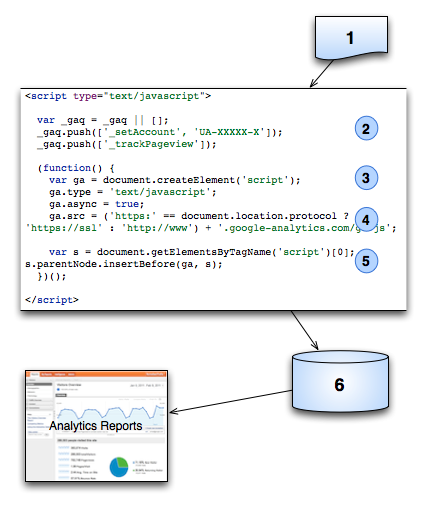
In general, the Google Analytics Tracking Code (GATC) retrieves web page data as follows:

  1. A browser requests a web page that contains the tracking code.
  2. A JavaScript Array named _gaq is created and tracking commands are pushed onto the array.
  3. A <script> element is created and enabled for asynchronous loading (loading in the background).
  4. The ga.js tracking code is fetched, with the appropriate protocol automatically detected. Once the code is fetched and loaded, the commands on the _gaq array are executed and the array is transformed into a tracking object. Subsequent tracking calls are made directly to Google Analytics.
  5. Loads the script element to the DOM.
  6. After the tracking code collects data, the GIF request is sent to the Analytics database for logging and post-processing.
GATC Request Process

Saturday, February 23, 2013

Different PPC Competitors Tools Analysis Strategy

I have used keyword spy for a while now, but also use SEM Rush and Spyfu in the past. They all work under the same principal when it comes to PPC. In this particular instance I suspected that we spend more money on a segment of the business than others, but the actual “baseline” in these tools contradict my gut check.

I am comfortable enough with my gut check to challenge that baseline, so I started down a path of figuring out why my assumption is wrong. I would rather start off defeating my own thought with data before going down rabbit holes.

So here is what I did:

  • Go to one of these tools, look for your own domain info and look at what they say you daily ad budget is.
  • Copy that daily ad budget and multiply it by 30 (this is what the tool says your monthly spend is)
  • Go to adwords and choose the last 30 days (if you have a huge up and down on spend, get a longer time frame and determine a consistent 30 day average)
  • Figure out what the observed percentage difference between the tools number and the actual.
  • Once you get that difference add it to the baseline in the tool. (it should be the same as your adwords account now.
  • That baseline percentage difference (in most cases) applies to all of your competitor’s accounts. You can get a better feel for their spend (not 100% accurate, but closer than what these tools say)

So after I ran the number that way, I felt even more so that my gut was closer than the tool, so I need to validate my data. So I hopped on live chat, asked the rep at one of these tool vendors why the number was so far off from reality and how its derived. The rep explained that with these tools they and most companies will eliminate multiple keywords from campaigns and ad groups and treat them as a single keyword.

What this means is that if you have potted plant, potted planters and potted soil enhancer they will likely remove two keywords and use just one. I get that, but depending on how campaigns are set up, this can eliminate hundred, thousands, or even more keywords from the daily ad budget and provide a misrepresentative number.

This is AWESOME news for some people because after you do the math, the formula may not apply to everyone the same way. As such the result will be wrong data all together.

The end result of this is that PPC research tools are good for research, but trying to use them as a source of accuracy and planning needs to be considered strongly before actually using any of the data,

Even the keyword lists these tools provide are very broad search query reports and drags in everything that served up an ad on a domain, so it does not mean that you or the competition actively bid on these keywords.


Monday, February 11, 2013

Importance of Pageviews and Unique Visitors Individually

Page Views vs. Unique Visitors – which one Matters most?

While page views are a good measure of which pages people are visiting the most, unique visitors tell you how many different people are actually coming to your site in a given time period.

Page views are great for measuring ad impressions – each page view is a new ad impression, therefore media agencies and ad sales teams tend to focus more on page views. The problem with this is that it often translates to poor decisions around user experience and content. Solely focusing on page views may lead to companies neglecting the importance of engaging and interactive content. This engaging/interactive content is what will actually keep people on your site and get them to return in the future. Companies focusing on page views will also often choose loading a new page instead of leveraging richer interactions, as the new page triggers the coveted page view. The problem this causes is that savvy end users want smooth interactions (i.e. in page data refresh, lightboxed galleries, infinite scroll etc.), but advertisers want hard reloads so they can show more ads.

Unique Visitors are a better measure of engagement on your site since this metric shows the individual people visiting your site over a specific time period. Focusing on unique visitors allows a bit more creative freedom when designing a website and permits you do so with a better user experience in mind. When you don't care about page view count, you can deliver an experience that will delight people by using fancier interactive functions like lightbox video galleries.

If page views are high but the bounce rate (the percentage of visitors who enter the site and leave rather than continuing to view other pages on the same site) is also high, then you know people are not staying on the site, and thus are not engaging with the content. Also, unique visitors mean very little unless you are tracking how long each new visitor spends on the page.

Time Spent is Also Important

The amount of time spent on the page will indicate whether or not users are engaging with the content actively. If you are consistently producing good content, these metrics start to become more meaningful.

The more important metric really depends on what your goals are. Page views seem to be the obvious choice for ad driven sites looking to increase their advertising revenue, while unique visitors is a better focus for companies that want to build and grow a loyal audience. Once you have built up one metric you should start to focus on building up the other. In the end, the goal should be to have highly engaged unique visitors that are driving a high volume of page views.


Friday, February 8, 2013

Strategy to Get Benefit From Expired Domains

People who are trading in the online environment are constantly searching for expired domain names and expired domain name traffic, because this has become a huge potential income source.

In order to find such a domain, you will need some tools which you must acquire at a convenient price, so that your investment may pay off soon. There are plenty of tools available that will track the thousands of in name registration and abandoned websites that have been removed from domain registry and become available for anyone to buy.

Not long ago, expired domain registration and the expired domain name traffic associated with it were only available to those who had an automated system and tools to match, and there were just a few privileged individuals who had such tools.

Nowadays automated tools and resources are available to whoever needs them in identifying, evaluating and buying these domain names. Many internet traders search for expired domains with heavy traffic and they buy these domains, in order to benefit form that traffic and increase sales tremendously.

Basically, expired domain names are those previously owned by a certain person or company that has not paid the domain name renewal fees; such a domain name is returned to the market around forty-five days after the expiration date, and they become available for purchase for anyone who would be interested.

Many domain names point to fully functioning websites, but there are also many sites that are registered for speculation, by people hoping they will resell the respective website to someone else for a quick profit.

There are many other domain names which are registered for website development, but do not appear online; this is because the owners of the respective domain do not really go through with the website development and allow the domain registration to expire.

There are numerous domain names, though, that come with fully functioning websites and receive daily traffic statistics from search engines, links and banner ads. This kind of an expired domain can bring someone pretty nice incomes, if they are redirected to another web site or are marketed with the so popular affiliate programs.

Everyone can make a profit from purchasing and expired domain name; some buy for speculation, and this has become a greatly profitable market, because many manage to resell these domains and make a few extra bucks on the way.

Many people buy expiring domain names and redirect the targeted traffic, by the use of targeted keyword domain names which help them get the level of traffic they're aiming for. Whatever you decide to do, you will probably have success with it because the internet is a highly lucrative and profitable market.
There are many people buying expired domain names all over the world, and they all do so in different ways, but most of them (if not all) for the same reason: they want to improve sales. However, everyone searches for different things when looking for expired domain names, so what works for someone may turn out to be a disaster for someone else.

That is why there are different classes of expired domain traders and they all have different aims. One class of traders might be on the market for buying names for future site developments, while other traders might be looking for a specific domain name for a certain future customer.

Another category of traders is the one consisting in people who are constantly searching for expired domain names with a lot of expired domain traffic and a high degree of popularity among a specific class of customers. For these traders, an expired domain with quite a bit of traffic is a source of huge future income, so they value such a site greatly and are constantly looking for this category of expired domain names.

These traders buy expired domains exclusively for their high traffic, and they basically place their products where they would be accessible to many people who know the respective site and often access it. This is a great source of income and it brings them a boost in sales, making them maximize their profit at a fast rate.

Because they have such a huge commercial value, these kinds of expired domains come at a high price, because everyone knows the importance of an expired domain with plenty of traffic attached to it.

They are premium sites and they cost quite a bit, but still many pay the high price since they know their investment will soon pay off. If you're in the market for this kind of an expired domain name, you are probably wondering what the best way of finding such a domain is. Basically, what you need to do is track a domain name and check for statistics on its traffic.

There are some ways for you to find out whether a certain domain will actually help you achieve your goal of improving sales. You could use a tool which enables you to find how many links a certain website shows, in order to see is the website still has a traffic ranking, or you could use PageRank.net to see if the domain you are interested in has a Google PageRank or not.

However, when you are interested in buying an expired domain, you should be careful; you could get a high traffic because there are many other people like you searching for a domain name, but this is not real traffic and it will not be recognized by a search engine.

Tuesday, February 5, 2013

Free Online Unused CSS Removal tools

Page loading time is obviously an important part of any website’s user experience.Page loading time is becoming a more important factor when it comes to search engine rankings.
Tools to Remove Unused CSS
In External and Internal Files,they are downloaded every time an HTML.
Always place your CSS and JavaScript in external files; it’s a best practice and makes your site easier to maintain and update.

Through Google Chrome:

  1. Open the “Developer Tools” in Google Chrome by hitting “Control-Shift-I” (Windows, your OS may vary). You can also find it in the wrench menu under “Tools”.
  2. Navigate to the “Audits” tab.
  3. Optionally, uncheck “Network Utilization”. It’s not need for the CSS auditing.
  4. Select “Audit Present State” and click “Run”.

After following those steps, the results will display on the same tab. One of the results may be “Remove unused CSS rules”. If it’s not there, you are the best CSS artist in the world. For the rest of us, expand the tree.


Dust-Me Selectors :
Dust-Me Selectors is a Firefox extension (for v1.5 or later) that finds unused CSS selectors. It extracts all the selectors from all the stylesheets on the page you're viewing, then analyzes that page to see which of those selectors are not used. The data is then stored so that when testing subsequent pages, selectors can be crossed off the list as they're encountered. You can test pages individually, or spider an entire site, and you'll end up with a profile of which selectors are not used anywhere.

Thursday, January 24, 2013

Utm_content report In Google Analytics Account

Google Analytics recognizes 5 specific parameters for measuring campaigns:

  1. utm_medium
  2. utm_source
  3. utm_campaign
  4. utm_content
  5. utm_term

Parameters exist for marketing campaign tracking. Each Google Analytics parameter has a different purpose and requires different values (more on that later).

utm_medium is used to designate the channel of this particular marketing. This includes large sources of visitors like:

  • Email
  • Paid search
  • Affiliate
  • Offline Ads

utm_source should differentiate sources of traffic within a given channel. If you have an affiliate program, you could separate out traffic from Linkshare from Commission Junction. In paid search, you’d want to distinguish Google, Yahoo and MSN.

utm_campaign is unique among the parameters. It’s the only parameter that can be common among different sources and mediums.

For example, let’s say you sell Earth friendly products and you have a marketing campaign promoting canvas totes for Earth Day on April 22nd. You could be promoting this in a variety of channels–email, paid search, and affiliate banners.

You can see all of the activity for that campaign, regardless of channel, rolled up into one report. Just give the utm_campaign parameter the same value (discussed below), such as “earth-day-totes-042208″, for each tactic in your marketing campaign. You’ll be able to get the standard metrics in the Campaigns report: visits, page views, bounce rate, conversion, etc (Go to Traffic Sources, then Campaigns).

utm_content is meant to help you provide a bit more information about the creative/messaging that sent a visitor to your site. There are any number of ways to use it:

  • Display – Banner size and message (e.g. 160×800-free-shipping)
  • Paid search – Ad variation.
  • Email – You could distinguish among the different locations of links, e.g. right-nav-link, offer-link.

utm_term is used only for non-AdWords paid search. Google automatically recognizes AdWords campaigns (if you want to get cost data in, you have to link it within AdWords under the report tab in the AdWords interface).


Monday, January 14, 2013

Custom reports,Advanced segments and dashboards Sharing

Sharing Custom Reports,Advanced segments and dashboards will help Senior Management ,Clients as well as help us to Analyze easily about Website Outcomes and immediate behavioural study of the Visitors and much more which can't be Explained
Sharing this link will only share a template, not the data about your site traffic. So for example sharing a dashboard will provide a user with the dashboard name, widgets and data fields to be populated with data from their Analytics account.

Dashboard Sharing


Custom Report Sharing


Sunday, January 13, 2013

Google Analytics for hourly Reporting Steps

First of all go to Custom Report Section of Google Analytics Account then :

Goahead to see the Report Section which will As like this :

Friday, March 23, 2012

Facebook Latest Updates

Facebook launching its Timeline pages for Brands and Businesses. Timeline was launched for individual pages.
Facebook now has its own smart lists on your profile, where it groups your close friends, coworkers, and schoolmates together with absolutely no input by you.It is alarming that Facebook is becoming more intelligent by the day. They are implications that need to be addressed not only on your own personal profile, but for your business as well.
Users can switch now or their pages will automatically turn to timeline view by 30th March. I have changed my Facebook page or Other One using timeline view so that i can judge and share with the my users the advantages and disadvantages of your Facebook pages.

On 18 March 2012 For business page facebook make drastic change like uses Static HTML: Iframe tabs in place of FBML Used Earlier Click here to Get the Same

Tuesday, February 7, 2012

Google New Algorithm Updates

ON November 3rd, 2011
For “freshness update,” it is an extension of what Google begin last year with Caffeine, an under-the-hood improvement that, among other things, helped Google index content quicker, so results were more realtime. This year, Google also brought out its Panda update, which was meant to decrease the rankings of so-called “content farms” – SEO-optimized entities that critics said filled Google with low-quality results. The change builds on top of its previous “Caffeine” update in order to deliver more up-to-date and relevant search results, specifically those in areas where freshness matters. This includes things like recent events, hot topics, current reviews and breaking news items.
Google used to have a search vertical specifically for the most recent updates at www.google.com/realtime, where it was indexing Twitter updates. However, when the contract with Twitter expired, Google shuttered the site (it now redirects to the Google homepage).

Tuesday, December 20, 2011

Social Plug-in Analytics for Google and Non-Google Social Media Sites

If you have Google "+1" and Facebook "Like" buttons on your site, it's important to know which buttons are being clicked and for which content. For example, if you publish articles on your site, you'll want to know which articles are most commonly "liked" or shared, and from which social networks they're being shared (for example, Google+ or Facebook). You can use this information to create more of the type of content that's popular with your visitors. Also, if you find that some buttons are rarely used, you may wish to remove them to reduce clutter.

The Social Engagement reports allow you to see how people shared content on your site via social actions. Examples of social actions on your site that can be tracked include Google +1 button clicks, Facebook "Like" and "Send" interactions, and Del.icio.us bookmarks.


No setup is required to track Google +1 interactions that occur on your site. However, to track interactions with non-Google interactions, you will need to modify your tracking code.

For the Process through Codes CHECK IT


Three reports on the Standard Reporting tab help you analyze the sharing and social activity on your site:
Visitors > Social > Engagement: Compare number of pages viewed per visit, average time on site, bounce rate, and other metrics for visits that included and did not include social actions. This allows you to determine whether people who used social actions that are available on your site viewed fewer or more pages, for example, than people who did not use use social actions.

For visits that included social actions, you can compare metrics for each social source/action combination. For example, you can compare whether visits that included a +1 button click had a longer average time on site than visits that included a Facebook Send.

Visitors > Social > Action: Compare the number of social actions (+1 clicks, Likes, etc) for each social source and social source-action combination.

For example, you can compare the number of Facebook Like's versus Facebook Send's on your site, or compare the total number of Facebook interactions with the total number of Twitter interactions. This information can give you an idea of which buttons are most important to provide on the site.

Visitors > Social > Pages: This report allows you to compare the number of actions on each page of your site. You can see this information by social source or by social source-action combination.

For example, you can see which pages on your site prompted the most Facebook actions, the most Twitter actions, or the most Facebook Like actions. Page is the page on which the social action was taken; Social Entity is the page that was shared (via a "Like", a "+1", etc). This information is useful for understanding which content is most viral and via which social networks and actions.

Sunday, December 18, 2011

Google Agency Toolkit: Create and Optimize Online Campaigns with Google Free Tools


Google Agency Toolkit is a collection of tools classified according to the different stages (planning, placement, creation and measurement stages) of an online marketing campaign.

Plan – Helps you uncover ideas and insights for your marketing strategies.

Place – Helps you control where and how your ads will appear

Create – Helps you build successful online marketing campaigns

Measure – Helps you gauge the performance of your campaigns.


Wednesday, October 5, 2011

How to get traffic resources for different campaigns in Google Analytics ?

These are Google's default URL tags:

• utm_campaign. This is a name for your campaign to help organize your results. You can use any name you want, but you should keep it short and descriptive so you will know what it means if you come back later to look at your data.
• utm_source. This is the source of the visitor; the specific site they are coming from.
• utm_medium. This is the medium of this particular source, such as a banner ad, email, or pay-per-click campaign. You might have five different banner ads that would have the same medium but different sources.
• utm_term. This is the keyword you are using in a keyword ad campaign. (Optional)
• utm_content. Use this parameter to differentiate ads or links on the same site that are sharing the campaign, source, and medium.
Building Your URLs
Let’s illustrate how these tags can work. Assume you have created a banner ad that is promoting supergreen hemp towels, and you want to evaluate the effectiveness of the traffic it is driving to your site. The banner ad is designed to link directly to the supergreen hemp towels product page.
Your product page URL might look like this:
http://www.ssrivastav.blogspot.com/Tracking/supergreen.html
You can build a richer URL, one that tracks that specific banner ad, like this:
http://www.ssrivastav.blogspot.com/Tracking/supergreen.html?utmcampaign=BannerAdSupergreensource=SupergreenBannerAd&utm_medium=BannerAd


Most Important must read :
Tracking Query Strings in Google Analytics
Once you let your banner ad run for a few weeks you will start to accumulate some data. You can log into Google Analytics and go to Traffic Sources > Campaigns.
If you used the example we gave above to build your URL, you will see a campaign called "BannerAdSupergreen" that will allow you to drill down and measure the performance of all traffic that has flowed through your banner ad campaign. The Dimensions menu will allow you to refine your reporting even further.
Select "Source" to sort your campaign by the sources you have defined.
Select "Landing Pages" to indicate the most popular landing pages on your site tied to your campaign. In this case, there only one landing page, the supergreen hemp towels page.
Examples of Valuable Campaign Tagging
With a little practice you can start to apply URL tags to the traffic you are sending to your site. Here are just a few examples.
• Pay-per-click Campaigns. Google Analytics seamlessly tracks your AdWord campaigns, but you likely would want to use URL tags to track pay-per-click campaigns coming from other sources.
• Banner Ads. Banner ads are a natural for tagging. In addition to the example above, you might want to make use of the utm_content tag to differentiate ad versions and test their effectiveness.
• Email Marketing. Many email marketing programs, such as Constant Contact, have their own campaign tracking built in, but by tagging your inbound URLs, you can centralize your analysis in Google Analytics.
• Social Media. If you embed fully tagged URLs in your Twitter/Facebook links, you can track your social media marketing efforts right in Google Analytics. Using one of the many URL shorteners (such as Bit.ly and Tiny URL) available on the web will make these long URLs transparent to your users. Make sure you use a URL shortener that correctly redirects traffic and attributes the referral to the correct source.
• Offline Advertising. To track offline advertising, such as print ads, you will likely need some knowledge of how to set up vanity URLs to redirect back to your landing pages that include the fully-tagged URLs.
Conclusion
Tagging your URLs creates powerful possibilities for analyzing your data in Google Analytics. With a little practice you can be doing some in-depth campaign analysis across all of your marketing campaigns.

Thursday, September 1, 2011

404 File Not Found Error resolution

How to resolve the problem

With In a Microsoft IIS environment normally right-click on the appropriate Web service icon in the IIS Management Console and select Properties. Select Custom Errors then select the 404 error, and then select Edit Properties. In the Message Type list select Edit URL being careful (!) to specify the error recovery page URL.


In a UNIX/Linux (Apache) environment you would modify the .htaccess file to include the command(s):

ErrorDocument 404 /404.htm
ErrorDocument 403 /404.htm
ErrorDocument 401 /buynowpage.htm
----- Error codes appear below

Tuesday, June 14, 2011

What are pligg sites ?

Pligg sites, you should know that these sites are communities dedicated to social voting, which are very similar to social bookmarking sites in all aspects, except for their size. Pligg sites are social media sites that can be created by anyone who wants to build a community around a specific area and target a particular audience. At this point, Pligg sites are among the fastest and most effective ways of launching a new social media website.

Bookmark your websites in Pligg Websites:
apnastory.com
bestdiggdir.com
bizsugar.com
bookmarkbuster.com
bookmarkindo.com
bookmarkparadise.com
bookmarkspiders.com
burninginfo.com
and so on

Saturday, January 29, 2011

What are the advantages of using AdWords over other PPC search ?

One advantage for using Google AdWords over other PPC search
engines like Overture is that Google AdWords lets you setup a display URL and
destination URL in your AdWord. This enables you to use your affiliate links in
your Google AdWord. When someone clicks on your AdWord, they are sent to
the merchants web site with your affiliate id in it. If someone makes a purchase
you earn a commission. This is an advantage over Overture because it precludes
the need for a web site. Overture requires that you own the web site that you are
sending traffic to. Therefore, with Overture you cannot send traffic directly to your affiliate link. You have to build a web page first.